
Running a modern company without automation can feel like carrying water with a leaky bucket. The best business automation tools 2026help teams reduce repetitive work, connect apps, and improve daily productivity. From simple workflow automation tools to advanced AI automation tools, today’s platforms can handle tasks that once consumed hours.
You can automate emails, customer follow-ups, data entry, social posts, approvals, and much more. The right business automation software can also improve accuracy while giving your team more time for meaningful work. In this guide, we’ll explore 10 powerful automation platforms for small businesses and enterprises, including the top tools for IT automation and ticket deflection in 2026. You’ll learn what each tool does, who it suits, and how it can support sustainable business growth.
10 Best Business Automation Tools in 2026: Quick Comparison
10 Automation Platforms Worth Knowing
Compare leading tools by their strongest use cases, from simple everyday workflows to enterprise automation.
Zapier
Best for general workflow automation
Connect supported apps and automate repetitive tasks with approachable, trigger-based workflows.
Make
Best for visual and advanced automation
Build visual scenarios that connect applications, process data, and coordinate multi-step workflows.
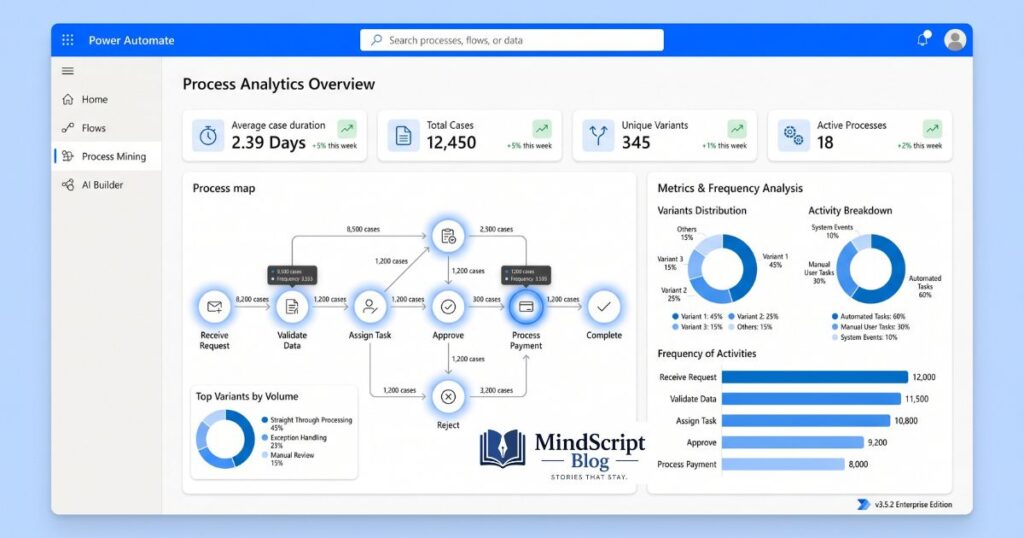
Microsoft Power Automate
Best for Microsoft 365 businesses
Automate recurring business processes across supported Microsoft services and connected applications.
HubSpot
Best for sales, marketing, and customer service
Coordinate customer journeys, lead follow-ups, and service processes within its connected business platform.
ActiveCampaign
Best for email marketing automation
Set up audience segments, automated email sequences, and customer communication journeys.
UiPath
Best for enterprise robotic process automation
Automate suitable repetitive, rule-based tasks across business systems with robotic process automation tools.
n8n
Best for self-hosted and developer-friendly automation
Create customizable workflows with technical flexibility and deployment options suited to your setup.
IFTTT
Best for simple personal and small business automation
Connect compatible services through straightforward rules that trigger actions when specific events occur.
Hootsuite
Best for social media management automation
Manage supported social accounts, organize publishing, and coordinate social media activities.
Buffer
Best for simple social media scheduling
Plan content and schedule posts across supported social platforms using a streamlined publishing workflow.
What Is Business Automation and How Does It Work?
At its simplest, business automation means using software to perform routine work without requiring someone to handle every step manually. Modern business automation tools can move information between applications, send notifications, update records, create tasks, and launch follow-up actions. This creates automated business processesthat run consistently in the background.
What Is Business Automation and How Does It Work?
At its simplest, business automation means using software to perform routine work without requiring someone to handle every step manually. Modern business automation tools can move information between applications, send notifications, update records, create tasks, and launch follow-up actions. This creates automated business processes that run consistently in the background.
For example, a website form can trigger a CRM record, send an email, notify a salesperson, and create a follow-up task. That entire chain can happen within seconds. These workflow automation tools are especially useful when employees repeatedly move information between the same systems.
How Does Workflow Automation Work?
Most automation begins with a trigger. The trigger could be a new customer, completed form, received email, payment, calendar event, or updated database record. The platform then follows predefined triggers and actions to complete the workflow.
More advanced systems add conditions, branching logic, AI decisions, and human approvals. As a result, business workflow automation can handle more than simple one-step tasks. It can coordinate entire processes across several departments while maintaining records for analytics, reporting, and compliance.
How to Choose the Best Business Automation Tool for Your Needs
Choosing business automation software requires more thought than comparing monthly prices. First, identify the work you want to automate. Then check whether the platform connects with your existing applications. Strong API integrations and app integrations matter because automation becomes far more useful when your systems can communicate naturally.
How to Choose the Best Business Automation Tool for Your Needs
Choosing business automation software requires more thought than comparing monthly prices. First, identify the work you want to automate. Then check whether the platform connects with your existing applications. Strong API integrations and app integrations matter because automation becomes far more useful when your systems can communicate naturally.
A small company may prefer no-code automation, while a technical organization may need low-code automation or deeper development controls. The best choice should improve business efficiency without creating another complicated system for your employees.
Connects seamlessly with your existing stack.
Matches your technical depth (No-code vs Low-code).
Ensures enterprise compliance and clear reporting.
You should also consider ease of use, scalability, security, reporting, support, and customization. A small company may prefer no-code automation, while a technical organization may need low-code automation or deeper development controls. The best choice should improve business efficiency without creating another complicated system for your employees.
No-Code vs Low-Code vs Developer Automation
No-code platforms let non-technical users create workflows through visual interfaces. They work well for common processes and quick deployment. Low-code platforms provide more control while still reducing the amount of programming required. Developer-focused systems go further with APIs, custom logic, webhooks, and code execution.
The choice depends on your team. If your staff needs straightforward task automation, no-code software can be ideal. If your workflows involve complex data or custom applications, low-code or developer-friendly tools may provide better long-term flexibility.
Best Business Automation Tools in 2026: Quick Comparison
The best workflow automation software depends heavily on your use case. Some platforms focus on connecting SaaS applications. Others specialize in CRM, marketing, Microsoft environments, social media, RPA, or developer-controlled workflows. Comparing them by one score can therefore be misleading.
Best Business Automation Tools in 2026: Quick Comparison
The best workflow automation software depends heavily on your use case. Some platforms focus on connecting SaaS applications, while others specialize in CRM, marketing, Microsoft environments, social media, RPA, or developer-controlled workflows. Comparing them by one score can therefore be misleading.
Zapier: Best Overall Workflow Automation Tool
Zapier remains one of the easiest entry points into no-code workflow automation. Its appeal comes from connecting many popular business applications without requiring traditional programming. Users can build workflows around leads, forms, emails, spreadsheets, calendars, project tools, and CRM systems.
Its visual workflow builder makes the process approachable. You select an event, choose what should happen next, and configure the required information. Businesses can also use automation templates to avoid building common workflows from scratch—making Zapier particularly attractive when speed and simplicity matter.
Lead Capture
Instantly connect contact forms directly to your sales CRM system.
Sales Alerts
Automatically notify sales representatives when high-value leads arrive.
Marketing Sync
Bridge campaign tools with spreadsheets, emails, and analytics platforms.
This makes Zapier useful for small businesses that lack dedicated developers. However, organizations with highly complex processes may eventually need more advanced workflow logic or enterprise controls.
Zapier: Best Overall Workflow Automation Tool
Best for:
Small businesses and teams that want to connect multiple apps without coding.
Key features:
App integrations, automated workflows, lead management, notifications, AI workflow options, and multi-step automations.
Pros:
Easy to use, beginner-friendly, broad integration ecosystem, and fast workflow setup.
Cons:
Costs can increase as task volume and workflow complexity grow.
Use Zapier if:
You want to connect forms, spreadsheets, email tools, CRMs, team chat apps, and other business software with minimal technical work.
Make: Best for Advanced and Visual Workflow Automation
Best for:
Small businesses and teams that want to connect multiple apps without coding.
Key features:
App integrations, automated workflows, lead management, notifications, AI workflow options, and multi-step automations.
Pros:
Easy to use, beginner-friendly, broad integration ecosystem, and fast workflow setup.
Cons:
Costs can increase as task volume and workflow complexity grow.
Use Make if:
You want to connect forms, spreadsheets, email tools, CRMs, team chat apps, and other business software with minimal technical work.
Make: Best for Advanced and Visual Workflow Automation
Make takes a more visual approach to automation. Its scenario-based interface allows users to see how information travels through multiple steps. This is useful when one workflow needs filters, conditions, branches, transformations, and several possible outcomes.
1. Form Submit
Customer sends inquiry
2. Check Info
Validate customer data
3. Multi-Sync
Update CRM & systems
4. Route Tasks
Assign custom workflows
This type of visual workflow automation gives advanced users considerable flexibility without requiring every process to become a custom software project.
The biggest advantage is visibility. You can inspect how each stage connects with another. That helps when managing automated workflows with several branches or data transformations.
👁️ Complete Process Visibility
Inspect every single data transformation stage visually in real-time.
🚀 High Complexity Capability
Built for agencies, operations teams, and experienced power users.
Make can feel more involved than simpler tools. That extra complexity becomes useful when straightforward trigger-and-action automation no longer covers the process.
Microsoft Power Automate: Best for Microsoft 365 Businesses
Best for:
Small businesses and teams that want to connect multiple apps without coding.
Key features:
App integrations, automated workflows, lead management, notifications, AI workflow options, and multi-step automations.
Pros:
Easy to use, beginner-friendly, broad integration ecosystem, and fast workflow setup.
Cons:
Costs can increase as task volume and workflow complexity grow.
Use Automate if:
You want to connect forms, spreadsheets, email tools, CRMs, team chat apps, and other business software with minimal technical work.
HubSpot: Best for Sales, Marketing and Customer Service Automation
Best for:
Small businesses and teams that want to connect multiple apps without coding.
Key features:
App integrations, automated workflows, lead management, notifications, AI workflow options, and multi-step automations.
Pros:
Easy to use, beginner-friendly, broad integration ecosystem, and fast workflow setup.
Cons:
Costs can increase as task volume and workflow complexity grow.
Use HubSpot if:
You want to connect forms, spreadsheets, email tools, CRMs, team chat apps, and other business software with minimal technical work.

ActiveCampaign: Best for Marketing and Email Automation
Best for:
Small businesses and teams that want to connect multiple apps without coding.
Key features:
App integrations, automated workflows, lead management, notifications, AI workflow options, and multi-step automations.
Pros:
Easy to use, beginner-friendly, broad integration ecosystem, and fast workflow setup.
Cons:
Costs can increase as task volume and workflow complexity grow.
Use ActiveCampaign if:
You want to connect forms, spreadsheets, email tools, CRMs, team chat apps, and other business software with minimal technical work.
UiPath: Best for Enterprise and Robotic Process Automation
Best for:
Small businesses and teams that want to connect multiple apps without coding.
Key features:
App integrations, automated workflows, lead management, notifications, AI workflow options, and multi-step automations.
Pros:
Easy to use, beginner-friendly, broad integration ecosystem, and fast workflow setup.
Cons:
Costs can increase as task volume and workflow complexity grow.
Use UiPath if:
You want to connect forms, spreadsheets, email tools, CRMs, team chat apps, and other business software with minimal technical work.
n8n: Best Self-Hosted and Developer-Friendly Automation Tool
Best for:
Small businesses and teams that want to connect multiple apps without coding.
Key features:
App integrations, automated workflows, lead management, notifications, AI workflow options, and multi-step automations.
Pros:
Easy to use, beginner-friendly, broad integration ecosystem, and fast workflow setup.
Cons:
Costs can increase as task volume and workflow complexity grow.
Use n8n if:
You want to connect forms, spreadsheets, email tools, CRMs, team chat apps, and other business software with minimal technical work.
IFTTT: Best Simple Automation Tool for Individuals and Small Businesses
Best for:
Small businesses and teams that want to connect multiple apps without coding.
Key features:
App integrations, automated workflows, lead management, notifications, AI workflow options, and multi-step automations.
Pros:
Easy to use, beginner-friendly, broad integration ecosystem, and fast workflow setup.
Cons:
Costs can increase as task volume and workflow complexity grow.
Use IFTTT if:
You want to connect forms, spreadsheets, email tools, CRMs, team chat apps, and other business software with minimal technical work.
Hootsuite and Buffer: Best for Social Media Automation
Best for:
Small businesses and teams that want to connect multiple apps without coding.
Key features:
App integrations, automated workflows, lead management, notifications, AI workflow options, and multi-step automations.
Pros:
Easy to use, beginner-friendly, broad integration ecosystem, and fast workflow setup.
Cons:
Costs can increase as task volume and workflow complexity grow.
Use Hootsuite if:
You want to connect forms, spreadsheets, email tools, CRMs, team chat apps, and other business software with minimal technical work.
AI Workflow Automation: How AI Is Changing Business Processes in 2026
The next stage of automation is increasingly intelligent. Traditional automation follows predefined rules. AI workflow automation can interpret information, classify requests, summarize documents, generate responses, and help decide what should happen next.
This creates a new category of AI automation tools that can work with less rigid instructions. Instead of simply moving data from one application to another, AI can examine the data first. That difference could reshape how businesses design workflows.
AI Automation vs Traditional Workflow Automation
Traditional automation works best when the rules are predictable. For example, “When a customer submits this form, create a CRM record” is straightforward.
AI becomes more useful when information requires interpretation. An AI system might read an incoming message, identify its purpose, summarize the request, and route it to the correct department. This combination of rules and intelligence is driving AI-powered automation across many industries.
How AI Agents Can Automate Business Processes
AI agents can potentially handle multi-step tasks such as research, customer inquiries, document analysis, lead qualification, and internal knowledge retrieval. Instead of executing one fixed command, an agent can work toward a defined goal.
However, businesses shouldn’t treat AI as magic. Clear permissions, human review, reliable data, and measurable outcomes remain important. The strongest AI-powered workflows combine automation speed with sensible human oversight.
Is AI Automation Safe for Business Use?
Security should sit at the center of every automation strategy. Businesses need to understand what information enters an AI system, where that information goes, who can access it, and how long it remains available.
Organizations should also consider security, privacy, compliance, permissions, audit trails, and error handling. Sensitive processes may require human approval before an automated action becomes final.
The Future of Business Automation in 2026 and Beyond
Business automation is shifting from isolated tasks toward connected processes. Instead of automating one email or spreadsheet update, companies increasingly want systems that coordinate entire workflows.
That evolution is called workflow orchestration. It connects applications, data, people, rules, and AI into a broader process. Over time, this could make automation a core layer of business technology rather than a collection of disconnected productivity shortcuts.
How to Choose the Best Business Automation Tool in 2026
Final Thoughts: Which Business Automation Tool Should You Choose?
The best business automation tool depends on the work you need to automate. Zapier and Make are strong choices for general workflows, while Microsoft Power Automate works well for organizations that rely on Microsoft 365. HubSpot and ActiveCampaign support sales and marketing automation, UiPath serves enterprise RPA needs, and n8n gives technical teams more control through self-hosting.
Before choosing from the 10 Best Business Automation Tools in 2026, map your current process, calculate the potential return on investment, and start with one clear workflow. The right platform should save time, reduce errors, and help your team work smarter.
Frequently Asked Questions
Business Automation FAQs
Clear answers to common questions about choosing and using business automation tools in 2026.
What is the best business automation tool in 2026?
The best platform depends on your needs. Zapier and Make are strong general workflow choices, Power Automate works well for Microsoft-focused teams, and n8n suits technical teams needing more control.
Which business automation tool is easiest for beginners?
IFTTT, Zapier, Buffer, and HubSpot are generally easier starting points for users who want simple automation with less technical setup.
What is the difference between Zapier and Make?
Zapier is often chosen for straightforward app integrations and simple workflow setup, while Make focuses on visual scenario building and more detailed workflow logic.
Is business automation useful for small businesses?
Yes. Small businesses can automate repetitive tasks such as lead collection, email follow-ups, invoices, appointment reminders, spreadsheet updates, and social media scheduling.
How do I choose the right automation tool?
Start with one repeated task, check your existing software integrations, compare total costs, test a simple workflow, and measure time saved before expanding.